

 Free Minecraft Server


NO SLOT LIMIT · NO CARD · 24/7
Free Minecraft
server hosting
Free Minecraft server hosting for Java and Bedrock. 2 to 16 GB of RAM, no slot limit, no card, and no idle sleep when the last player leaves.
JAVA + BEDROCK · PAPER, FORGE, FABRIC
Online in ~40 seconds Upload an existing world

10 / hcredits for 2 GB
your free claim covers it
01 - WHAT YOU GET
Everything a Minecraft world needs.
Same hardware for everyone, paying or not. Credits only decide how much RAM you run and for how long.
High-end hardware
Ryzen 9 9900X and 5950X CPUs, up to DDR5 memory and NVMe SSDs. The same fleet serves free and Premium accounts.
Europe & North America
Deploy on the continent your group actually lives on. Low ping matters more than people expect.
Scale in seconds
Push RAM and disk up for a modded playthrough, drop them back afterwards. Restart and you are done.
Automated backups
Regular snapshots kept on our storage. Restore a world in one click when a session goes badly wrong.
Full file access
Worlds, configs, mod and plugin folders - all editable in the browser, or over SFTP with Premium.
Discord support
A real community channel with the team in it. Ask for a feature or a new game and it genuinely gets discussed.
SERVER TYPES
All our Minecraft server types and variants
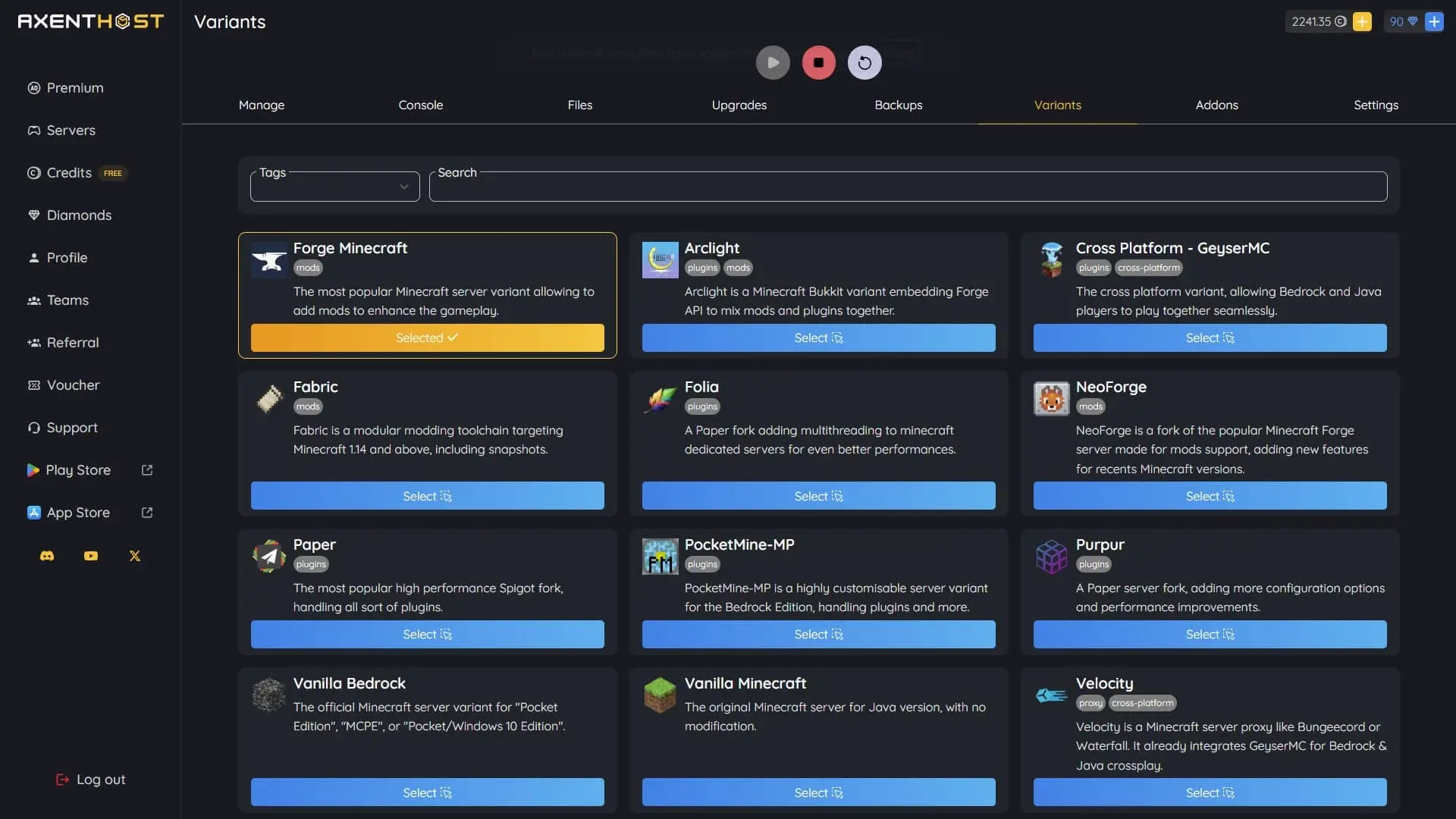
Java or Bedrock, vanilla or heavily modded. Pick a variant when you create the server and switch whenever you want - every version below is one click away.
- VanillaThe original Minecraft server for Java version, with no modification.48 versions
- PaperThe most popular high performance Spigot fork, handling all sort of plugins.53 versions
- PurpurA Paper server fork, adding more configuration options and performance improvements.40 versions
- FoliaA Paper fork adding multithreading to minecraft dedicated servers for even better performances.17 versions
- ForgeThe most popular Minecraft server variant allowing to add mods to enhance the gameplay.76 versions
- NeoForgeNeoForge is a fork of the popular Minecraft Forge server made for mods support, adding new features for recents Minecraft versions.19 versions
- FabricFabric is a modular modding toolchain targeting Minecraft 1.14 and above, including snapshots.47 versions
- BedrockThe official Minecraft server variant for "Pocket Edition", "MCPE", or "Pocket/Windows 10 Edition".384 versions
- PocketMine-MPPocketMine-MP is a highly customisable server variant for the Bedrock Edition, handling plugins and more.2 versions
- GeyserMCThe cross platform variant, allowing Bedrock and Java players to play together seamlessly.96 versions
- ArclightArclight is a Minecraft Bukkit variant embedding Forge API to mix mods and plugins together.14 versions


Free forever. Here is exactly why that works.
You claim credits - fifteen an hour on the site, up to thirty more in the mobile apps, plus a daily spin. Five credits run one gigabyte for one hour, so a 2 GB Minecraft world costs 10 credits an hour. Advertising and Premium members cover the rest of the bill.
Read how credits work02 - THE LONG ANSWER
A free Minecraft server on AxentHost is a real server, not a trial. You get 2 to 16 GB of RAM, up to 20 GB of NVMe storage, no player slot limit and no credit card field. It runs on credits you claim for free. Five credits buy one gigabyte of RAM for one hour. A 2 GB Minecraft world costs 10 credits an hour, and the hourly claims are worth up to 45. And unlike most free hosts, it does not go to sleep when the last player leaves.
How the free Minecraft server hosting works
There is no plan to reach and no card to enter. You register with an email or a Discord account, claim credits, and spend them on hardware. The exchange rate is fixed and public: 5 credits = 1 GB of RAM for 1 hour. Minecraft runs comfortably on 2 GB for a small group. That puts a vanilla or lightly-modded world at 10 credits an hour.
Against that, an hourly claim on the site is worth 15 credits. The Android and iOS apps add up to 30 more an hour through rewarded videos. A daily spin, offerwalls and referrals sit on top. So a 2 GB world is paid for by the web claim alone, and five credits an hour are left to bank towards more RAM.
The honest part: the credits are what keep it free, so you do have to keep claiming them. If your balance reaches zero, the server is powered off cleanly and a backup of your world is kept. Nothing is wiped, nothing resets. Claim again, restore, and carry on. Advertising and Premium members pay the rest of the bill on our side. There is no hidden limit on your world.
Does the server sleep when nobody is playing?
No. AxentHost has no idle sleep and no start queue. Your world stays online while it is credited, whether anybody is connected or not. A friend in another timezone can join at three in the morning without you being awake to press start. There is also nothing to wait behind. You press start and the server comes up in about forty seconds, at peak hours as much as at dawn.
This is where the free hosts usually differ. It is worth being precise about it rather than writing "24/7" and moving on. Aternos pauses your server when the last player disconnects, and queues you behind other people's servers when the platform is busy. Minehut sleeps free servers the same way. On AxentHost, only an empty credit balance stops a Minecraft server. That is a number you can see and top up, not a policy waiting to catch you out.
How much RAM does a Minecraft server need?
You pick the RAM yourself, between 2 and 16 GB, and change it between sessions. The price is linear, so the hourly cost is easy to work out in advance:
- 2 GB - 10 credits/h. Vanilla or a handful of plugins, a few friends. Covered by the web claim.
- 4 GB - 20 credits/h. A plugin survival server, a bigger group, world pre-generation.
- 6 to 8 GB - 30 to 40 credits/h. Most modpacks, or a public server with plenty of chunks loaded.
- 12 to 16 GB - 60 to 80 credits/h. Heavy modpacks and large communities.
Storage scales with it, up to 20 GB of NVMe. That is more than enough for a modpack plus its backups. Say a modded playthrough needs 8 GB for a fortnight and 2 GB afterwards. Push it up, restart, and drop it back down when you are done. The change takes effect on the next start, and nothing in the world is touched.
How many players can join?
As many as you want. We do not sell player slots, and there is no plan to move up to. There is no 10-slot ceiling on free like Minehut's, and no plan-based slot count like Nitrado's. You set max-players yourself in server.properties. The only real limit is how much RAM the world runs on and how heavy your mods are.
In practice that means the size of your Discord, not the size of your wallet, decides who gets in. If the server starts to struggle, add a few gigabytes of RAM for a few more credits an hour. There is no bigger plan to buy.
Java, Bedrock and crossplay in the same world
Both editions run on AxentHost. You can create a pure Java server, a pure Bedrock server, or a single world that both can join. Crossplay uses the GeyserMC variant. We run it as a one-click server type with 96 supported versions. The friend who only has a phone, a tablet or a console plays in the same world as everyone on PC.
Java players connect with the normal address. Bedrock players use the same host, with the Bedrock port shown in your panel. The full walkthrough is in our guide to creating a crossplay server with Geyser.
Every loader, version and modpack
Free does not mean vanilla-only. AxentHost runs 11 Minecraft server types across 785 installable versions. Vanilla for a clean world. Paper, Purpur, Folia and Spigot forks for plugins. Forge, NeoForge and Fabric for mods. Bedrock, PocketMine-MP, GeyserMC and Arclight on top. You choose the type and the version when you create the server. You can switch either one later from the panel without losing your world.
Modpacks install in one click from CurseForge and Modrinth. The usual plugin stack - EssentialsX, LuckPerms, WorldEdit - works out of the box on Paper. Anything else you drop in yourself. The file manager gives you the whole server directory, mods and plugins folders included, editable in the browser. See every Minecraft server version we run.
AxentHost against the other free Minecraft hosts
We wrote these comparisons ourselves, including the rows where the other host wins. We re-check them from time to time.
- AxentHost vs Aternos - no start queue, no sleep when the server empties, and 30+ games instead of two.
- AxentHost vs Minehut - no 10-slot cap on free, 2 to 16 GB instead of about 1, and full file access.
- AxentHost vs FalixNodes - no queue, no idle sleep, and RAM you resize yourself.
- AxentHost vs Nitrado - genuinely free, with no card required to create your first server.
The full feature-by-feature table puts all four side by side on their free offering.
03 - PANEL OVERVIEW
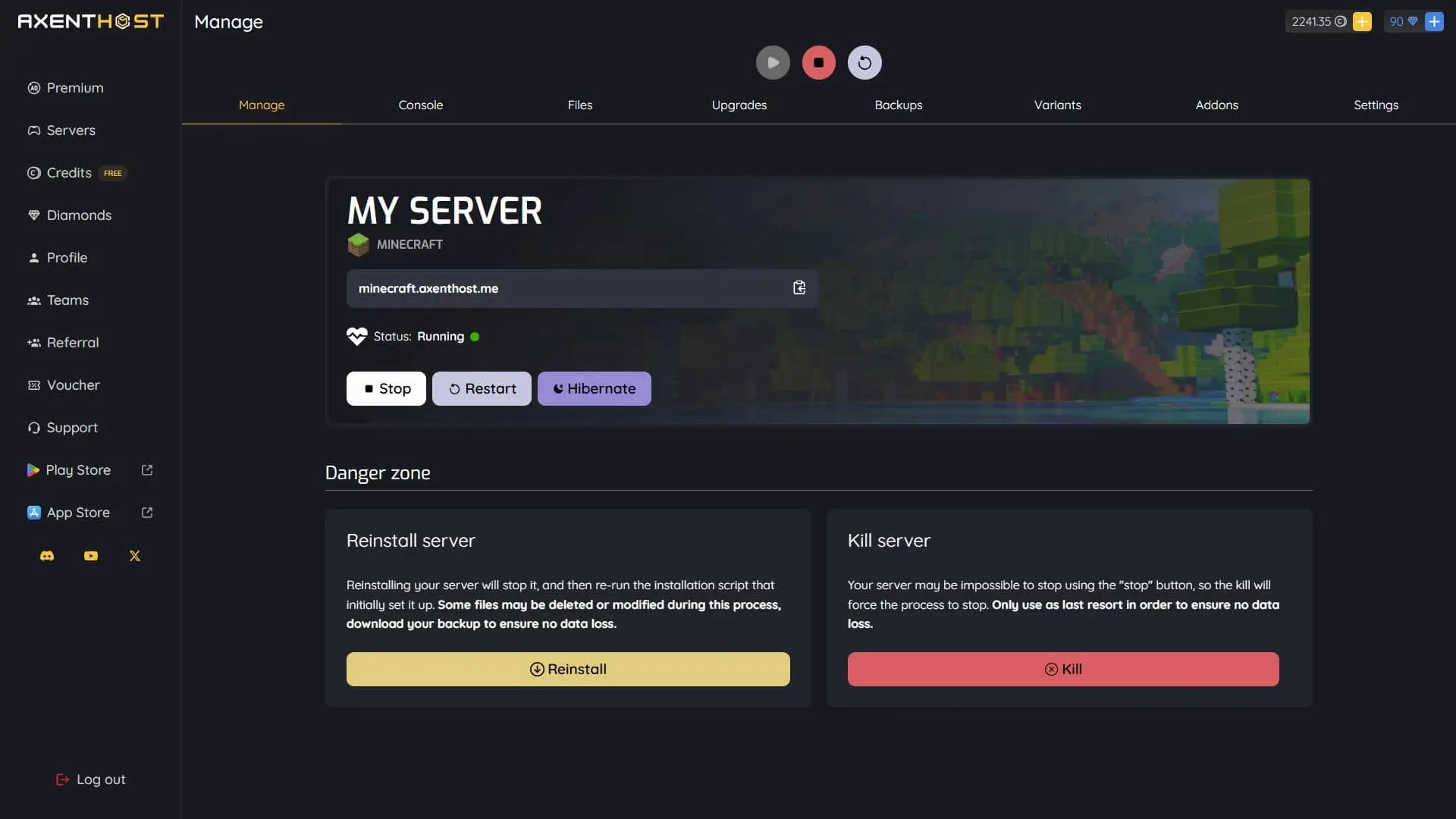
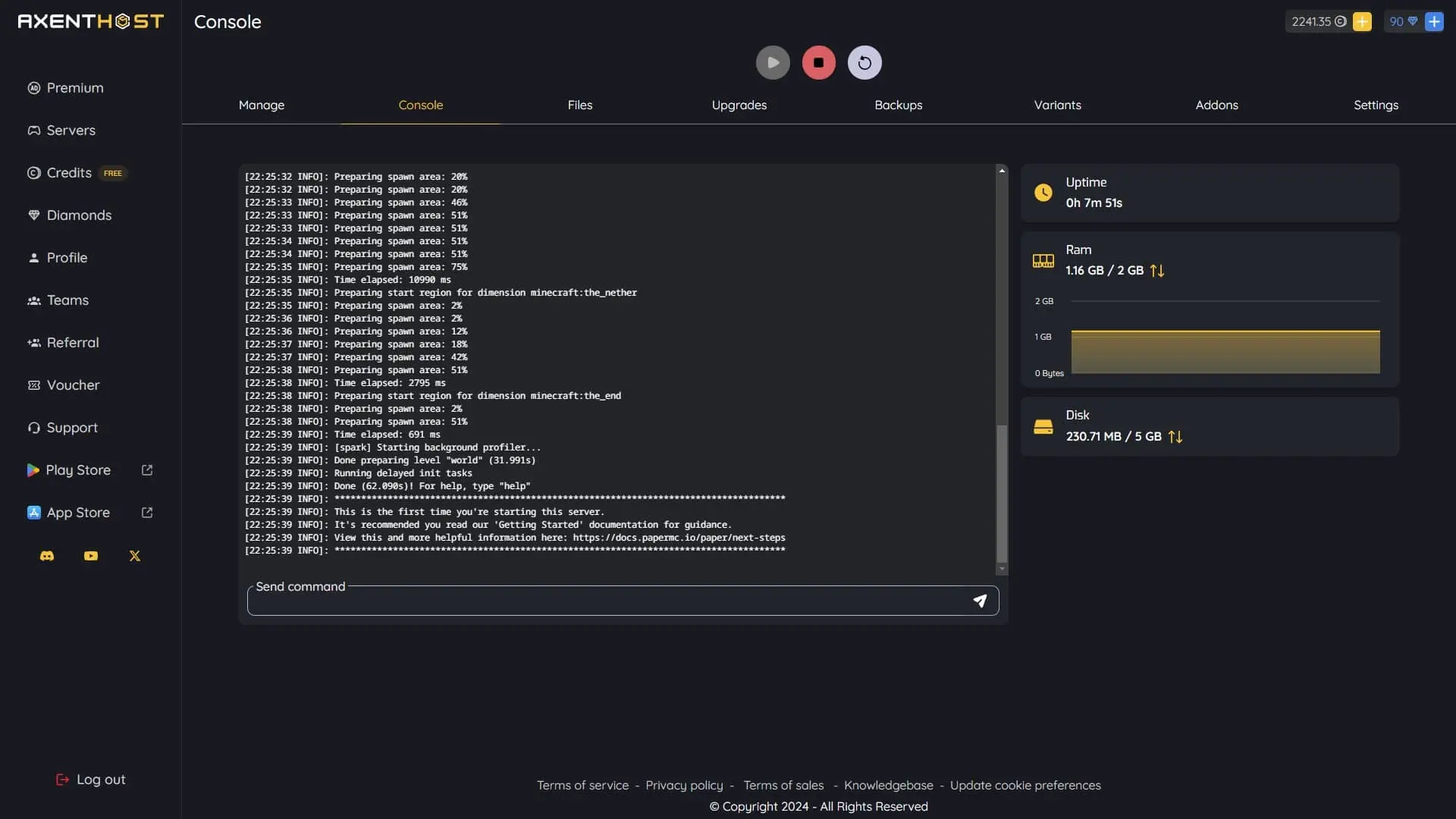
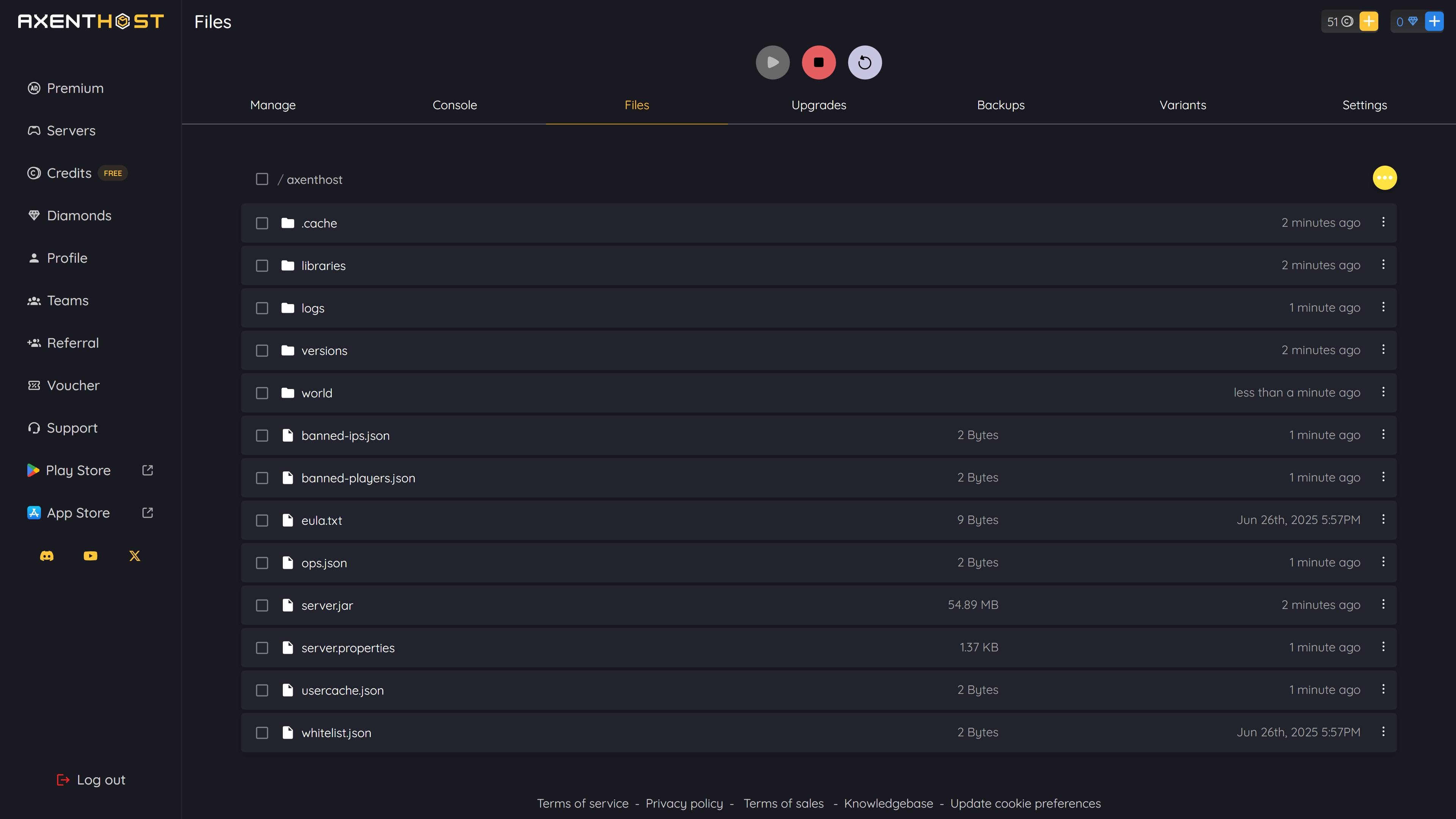
The panel you will actually be using.
Built by us for players, in dark mode, with everything a Minecraft world needs one click away.
04 - GETTING STARTED
How to get your free Minecraft server.
Register on AxentHost
Email or Discord, a few clicks, no card field. Your first credits are waiting as soon as you land in the panel.
Claim your free credits
Fifteen an hour on the site, up to thirty more in the mobile apps, plus a daily spin. A 2 GB Minecraft world needs 10 an hour.
Create your Minecraft server
Pick the variant, choose your world settings and node, and deploy in about forty seconds.
Invite your friends
Copy the address out of the panel and drop it in your group chat. No slot limit, so bring everyone.
Already have a world?
Upload your save in the file manager, point the config at it, and carry on from exactly where you left. Works for modded worlds too.
Read the upload guide →05 - MINECRAFT FAQ
Minecraft hosting questions.
Is AxentHost really free?
Yes. AxentHost runs on a credit system: you get free credits to run your Minecraft server, and you can keep earning more for free. There is no paywall to create one and start playing. See "How are servers free on AxentHost?" above for the full explanation.
Do I need a credit card?
No. Creating an account and launching a free Minecraft server needs only an email and a password. No credit card or payment method is required at any point.
Do free servers sleep or shut down when nobody is playing?
No. AxentHost has no idle sleep and no activity queue - your server stays online even when nobody is connected, unlike hosts that pause empty ones. The only thing that stops it is running out of credits; while it is credited, it keeps running whether players are online or not. See how servers stay free on AxentHost for the credit system in detail.
How much RAM do I get for free ?
You can configure up to 16 GB of RAM, starting from 2 GB. You choose how much your server uses, and higher RAM simply consumes credits faster.
How many players can join my server?
AxentHost does not cap your player slots - the practical limit is your server RAM and the game version you run. You set the slot count yourself in server.properties.
Can I install mods, plugins and modpacks?
Yes. AxentHost supports Paper, Spigot, Purpur and Folia for plugins, and Forge, NeoForge and Fabric for mods, with one-click installs from CurseForge and Modrinth. Popular plugins like EssentialsX, LuckPerms and WorldEdit work out of the box.
Does AxentHost support Java and Bedrock? Can they play together?
Yes to both. You can run Java Edition or Bedrock Edition servers, and you can enable crossplay between Java and Bedrock players using our GeyserMC option so friends on any device can join the same world. Follow our guide to create a crossplay server with Geyser.
How do credits work, and what happens if I run out?
Your server spends credits for each hour it runs; more RAM and disk cost more per hour. When your balance runs out, the server is safely powered off and a backup of your world is kept, so nothing is lost - you can restore and restart it once you have credits again. You top up by earning more free credits in your dashboard - see how servers stay free on AxentHost for the ways to earn them.
Can I use my own domain, and how do my friends join?
Your server gets its own address you can share with friends so they can connect directly. You can also point your own domain at it. Step-by-step guides are in our Minecraft server setup guides.
WHAT PLAYERS SAY
What players say about their Minecraft servers
Overall amazing
Easy to use, nice credit system for free gaming.
Someone simply sent me a link with instructions, which was very effective; very responsive (no more than 2 hours for a reply) thanks again for the help!
I think that's the only service, where i can host scp:sl server for free and it's doing it's job very well.
Free and Easy. Great process. Easy to use.
Easy to navigate and cheaper than paying monthly with their credit system!
Used the site for Minecraft hosting. I like the way the credit system works, it helped keeping the server running for days.
Best Free Hosting, better than Aternos!
Awesome website, really enjoyed the 2 week Minecraft phase and definitely going to subscribe for the next big project. Thank you for the good free experience and the coins system.
It works great. The website is very clean and user friendly and it was really easy to set up the server. Exactly what you want to find when you're no expert. Devs should take notes. Discord server and YouTube channel also active and helpful.
They do hourly service which is great, I have a garrys mod community where I run events every 2 weeks based on what the community wants, and instead of paying for a machine for an entire month, I can just open and shut whenever I want my server. It is great because I only need 5 hours max to setup the server based on voted gamemode and then the 2 hours event time that we play. Literally costs me not even 1 euro per month. Plus they give you enough free credits that stacks and you can host servers for free.
This server hosting is the best i love it and it runs soo smooth.
Your Minecraft world, online in forty seconds.
No card, no slot limit, no host to keep awake. Just claim your credits and play.